

With the release of version 1.6.5, 1C:Drive introduces built-in budgeting functionality designed specifically for growing and mid-sized businesses. This new feature allows companies to move away from scattered spreadsheets and brings structured budget planning and variance analysis directly into the ERP system, where all operational data already lives.
How the Budgeting Process Usually Looks in Many Growing Businesses
In many growing companies, the budgeting process still follows a familiar but inefficient pattern. Sales forecasts are prepared in one file, expense estimates in another, and cash flow projections in yet a third. Department heads and project managers send their numbers via email or shared documents. Then someone has to spend hours copying and pasting data, fixing formulas that break easily, and trying to reconcile everything into a single master budget.
By the time the budget is finally assembled, the information is often weeks old. Comparing planned figures with actual results usually requires exporting data from the accounting system and performing manual calculations. For businesses that run multiple projects simultaneously, keeping project-level budgets aligned with the overall company budget adds another layer of complexity and increases the risk of errors.
As a result, teams waste significant time on routine tasks, have limited real-time visibility, and often end up making decisions based on incomplete or outdated information.
What’s New: Budgeting in 1C:Drive 1.6.5
The new Budget document and Budget Analysis report address these challenges by integrating planning directly with your sales, income, expense, and cash data inside 1C:Drive.
How to Create and Fill a Budget in 1C:Drive
Creating a budget in 1C:Drive 1.6.5 is straightforward:
-
Open the Budget document from the Company menu under Planning (after enabling the feature).
-
Choose the scope of the budget – company-wide, for a specific department, or for an individual project.
-
Select the budget items you want to include and define the planning period with the needed granularity (for example, the full year 2026 broken down by months).
-
1C:Drive automatically generates a clear, grid-based structure for you.
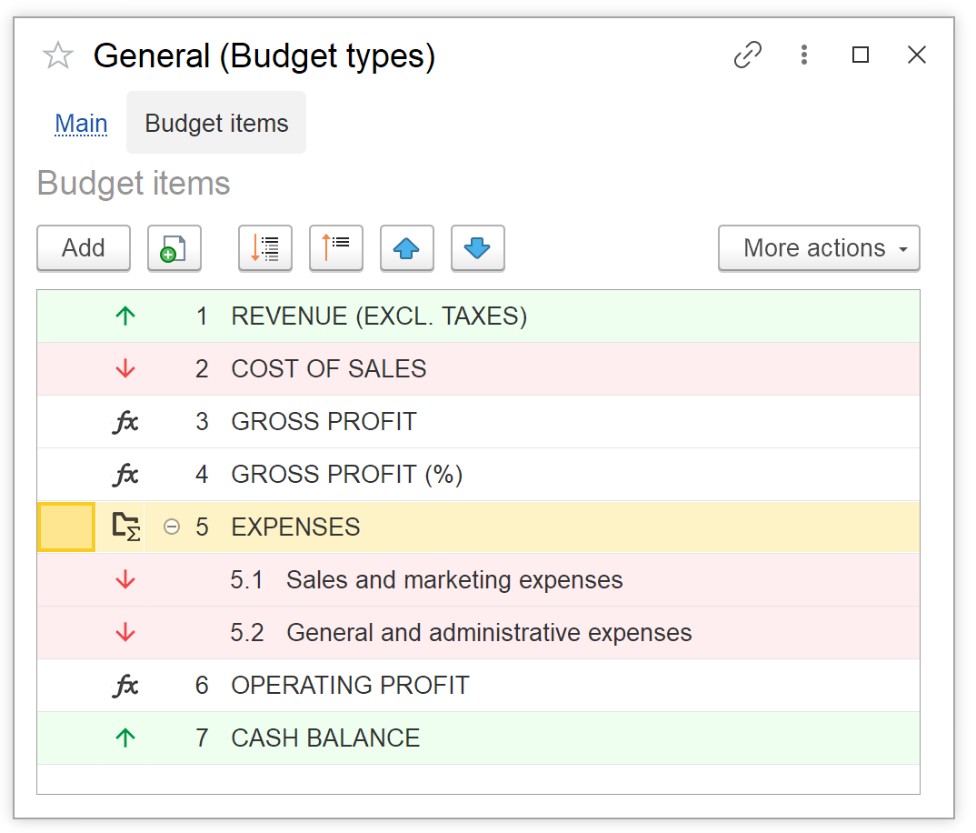
You can base budget items on real data from the following sources:
-
Sales
-
Income and expenses
-
Income summary
-
Cash balance (available only for non-project budgets)
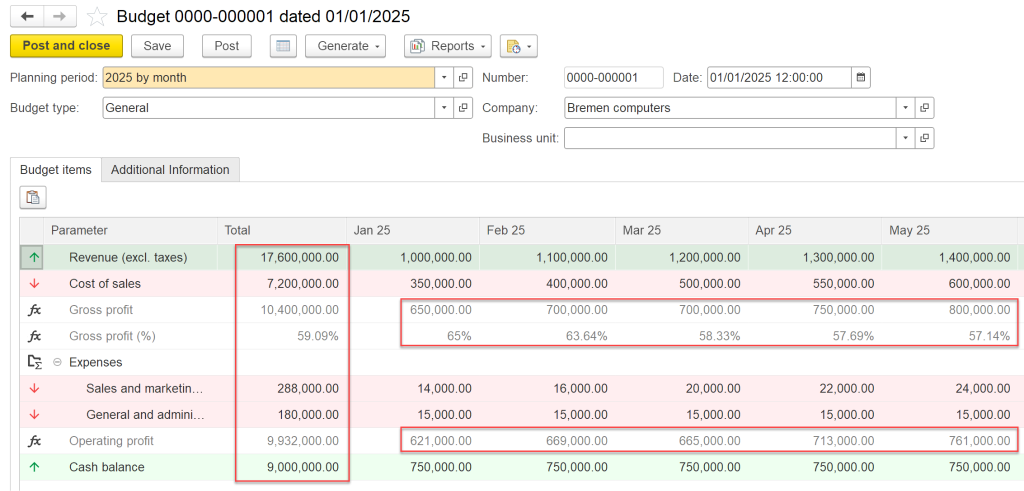
To fill the budget quickly, simply enter a total value for any budget item and let the system automatically distribute it across the selected periods. You can then fine-tune individual months or quarters manually, or paste values directly from a spreadsheet. All totals are recalculated automatically, which helps avoid version conflicts and calculation mistakes.
How to Use the Budget Analysis Report in 1C:Drive
Once the budget is created, the Budget Analysis report provides a convenient side-by-side view of budgeted versus actual performance. The report clearly shows:
- Budgeted amounts
-
Actual amounts
-
Absolute variance
-
Percentage variance
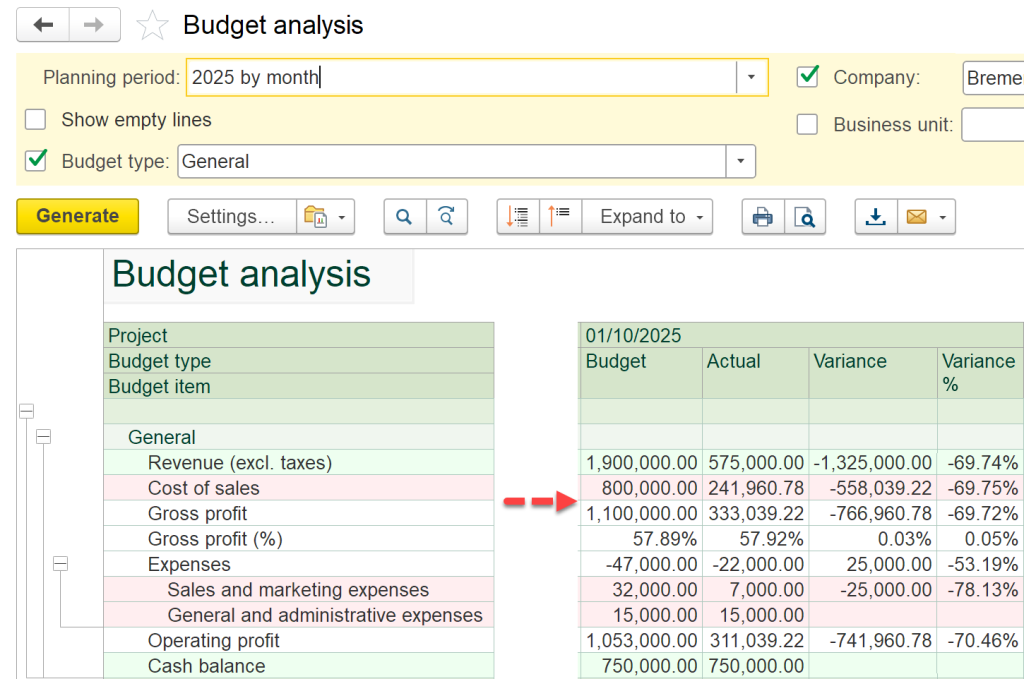
You can access the report from Company > Reports for any budget. For project-specific budgets, the same report is also available with one click directly from the project card. This makes it much easier to identify deviations early and take timely corrective actions.
How to Enable Budgeting in 1C:Drive v.1.6.5 and above
Enabling the new budgeting tools is simple and takes less than a minute:
- Go to Settings > Company.
-
In the Budgeting section, check the box “Use budgeting”.
-
All budget-related features will then appear automatically in the Company menu under Planning.
No complex setup or additional configuration is needed. The functionality works seamlessly with the data you already have in your 1C:Drive system.
Practical Benefits for Growing and Mid-Sized Businesses
The integrated budgeting tools help reduce the disconnect between planning and actual operations. Company-wide budgets and project budgets can now be managed in one place, with direct links to sales, expenses, and cash positions. This often leads to more accurate planning, faster analysis, and fewer unpleasant surprises at month-end.
Key advantages include:
- Budget planning becomes directly connected to your live operational data.
-
Significant reduction in time spent on manual data entry and reconciliation.
-
Faster and more accurate identification of budget variances.
-
Easier management of both company-wide and individual project budgets in one system.
Many growing businesses find that moving budgeting inside the ERP helps them shift from reactive firefighting to more confident, data-driven planning.

Frequently Asked Questions
How do I enable budgeting in 1C:Drive?
Go to Settings > Company, locate the Budgeting section, and select the “Use budgeting” checkbox.
Budget items can be based on Sales, Income and expenses, Income summary, or Cash balance (cash balance is available only for non-project budgets).
Can I create project-specific budgets in 1C:Drive?
Yes. The Budget document supports company, department, and individual project budgets. The Budget Analysis report is also available directly from the project card.
Does 1C:Drive budgeting support different planning periods?
Yes. You can select any period and granularity (monthly, quarterly, yearly, etc.), and the system will automatically build the appropriate grid.
Can I paste data from Excel into the 1C:Drive budget?
Yes. You can copy and paste values directly from a spreadsheet into the budget grid.
For detailed step-by-step instructions with screenshots, refer to the official tutorials: Budgeting in 1C:Drive